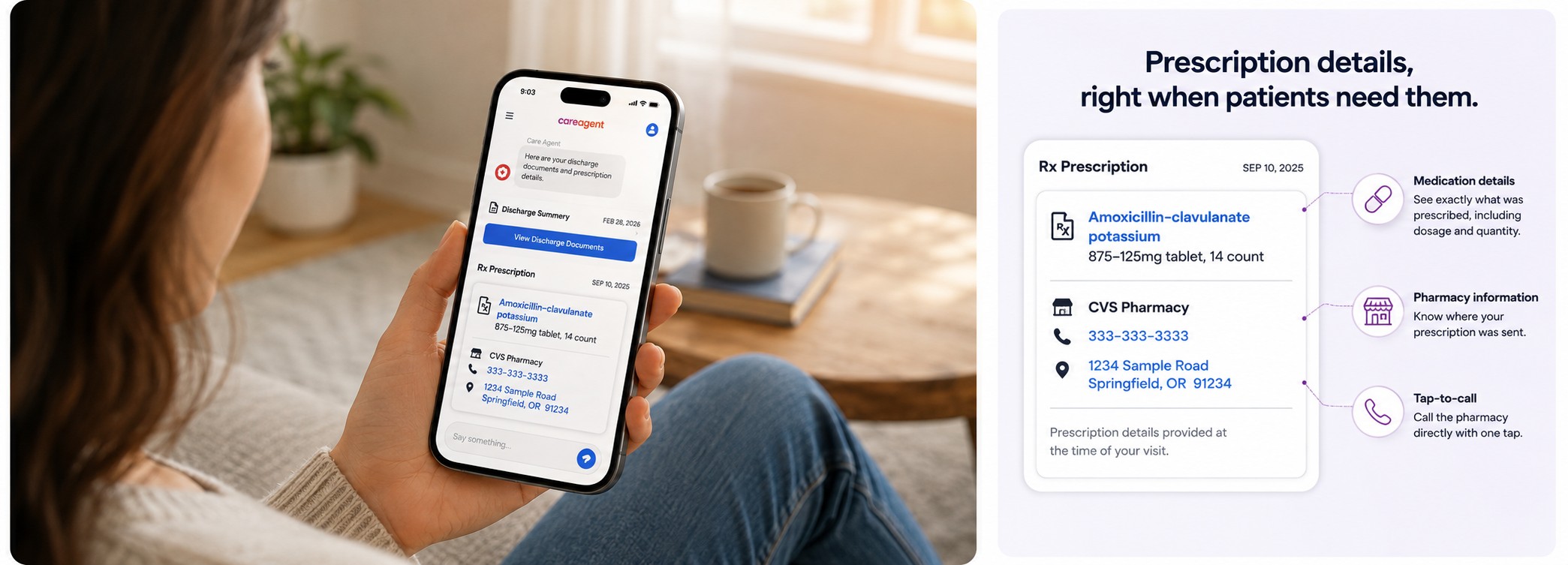
Prescription Management for Better Patient Aftercare
See how prescription management aftercare can help patients understand what was prescribed, where it was sent, and what to do next after a visit.
See how you can use Care Agent to reduce staff burden, keep patients informed, and bring predictability to your operations
Get StartedWhen a patient leaves a healthcare visit with a new prescription, the appointment may be over, but the questions often are not.
- What was I prescribed?
- Which pharmacy did it go to?
- How much am I supposed to receive?
- Do I need to call the clinic if I cannot remember?
These are simple questions. Still, they can create friction for patients and extra work for staff. Better patient communication and prescription aftercare can help.
For many clinics, prescription-related questions become part of daily post-visit call volume. A patient gets home, remembers that a prescription came up, and then realizes they are not fully sure what happens next.
That is where better prescription aftercare can make a difference.
Care Agent is patient engagement software that can bring prescription details into the same digital discharge flow patients already use. Instead of asking patients to remember every detail from the visit or call the practice for help, Care Agent can surface key prescription info at discharge.
The goal is simple: help patients see what was prescribed and where it was sent while reducing avoidable admin work for the practice.
How Care Agent supports prescription management
Care Agent Prescription Management helps patients access key prescription and pharmacy details in their digital discharge experience. By sharing this information at discharge, it reduces common post-visit confusion and can cut repeat prescription calls to clinic staff. The feature is read-only and shares info only, so it supports clearer aftercare without adding new workflows for patients or practices.
The aftercare experience does not end when the patient walks out
Healthcare teams often focus on the visit itself. But from the patient's point of view, some of the most important questions come after the appointment.
A patient may leave with discharge instructions, follow-up steps, a prescription, and a lot to remember. Even when the provider explains everything well, patients may not keep every detail.
That creates a common gap in patient communication.
The patient may know a medication was prescribed, but not the name. Or they may remember the medication but not which pharmacy has it.
The result is often a call back to the clinic.
Care Agent's Prescription Management research highlight three common post-visit questions: what was I prescribed, where was it sent, and is it ready to pick up? The new feature is designed to answer the first two questions at discharge by surfacing prescription and pharmacy details in the patient's existing Care Agent experience.
That may seem small. At scale, though, removing even part of those repeat calls can make aftercare more efficient.
What prescription management looks like with Care Agent
Care Agent Prescription Management works as part of the current discharge flow. It is not a separate task for the patient or staff.
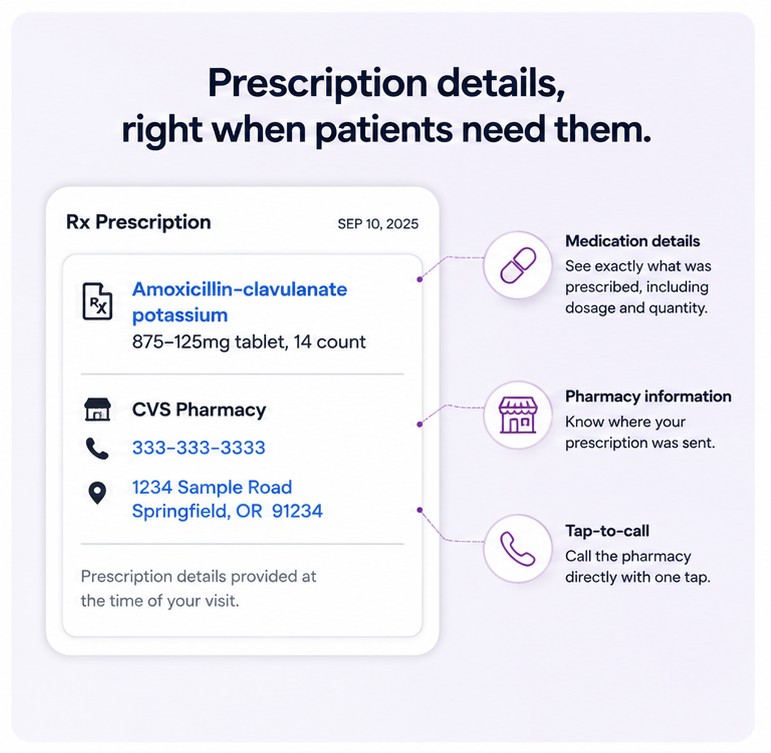
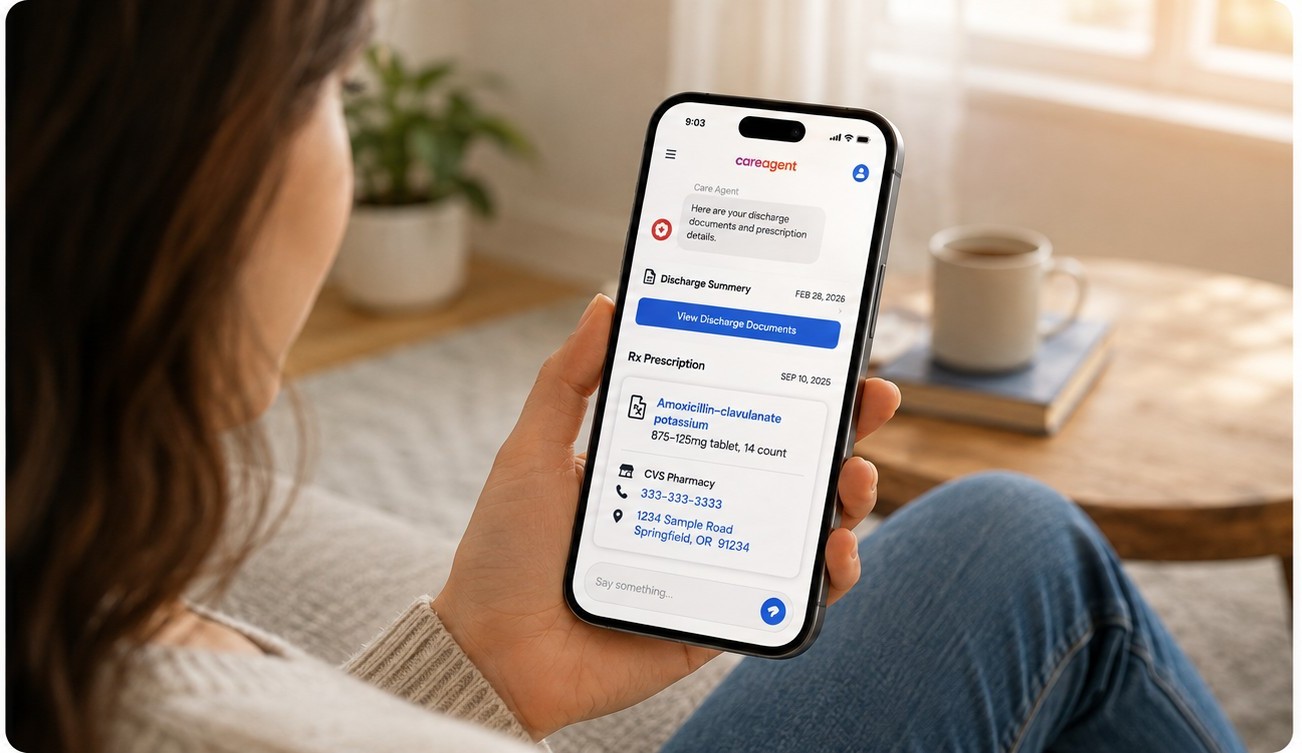
When a prescription is issued during the visit, Care Agent can show a structured prescription card beside the patient's discharge information.
The patient does not need to download another app or start a new workflow. Prescription details appear in the Care Agent conversation they already use for post-visit communication.
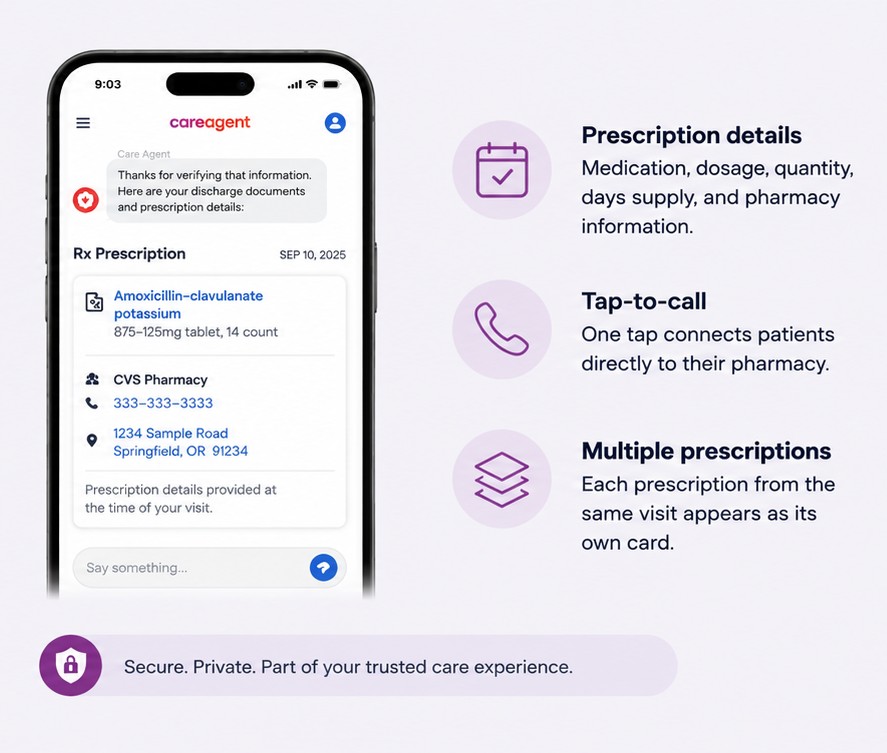
The prescription card can include:
- Medication name
- Dosage
- Quantity
- Days supply
- Pharmacy name
- Pharmacy address
- Pharmacy phone number
When the pharmacy phone number is available, Care Agent can also provide a tap-to-call link so the patient can contact the pharmacy from their phone.
If several prescriptions were issued in the same visit, each one can appear as its own card in the same discharge experience.
The experience is meant for info only. Care Agent does not interpret the prescription, give dosage advice, or offer clinical guidance. The information reflects the prescription data available at discharge.
Why prescription communication matters for patient aftercare
Good aftercare is partly about making the next step clear. Patients should not have to rebuild what happened during the visit after they get home.
When prescription details are easy to find, patients have a clearer path forward.
1. Patients leave with fewer unanswered questions
A visit can include a lot of information in a short time. Even simple instructions can fade once the patient leaves the practice.
Placing prescription information next to discharge documents gives patients a place to check after the appointment. Instead of wondering what medication was prescribed or where it was sent, they can review it on their phone.
2. Staff receive fewer repeat prescription calls
Questions about prescriptions may be simple, but answering them still takes staff time. Someone has to pick up the phone, identify the patient, find the encounter, verify the prescription, locate the pharmacy details, and explain them.
Multiply that across dozens of patients and multiple locations, and small questions become a big workload.
Care Agent is built to answer many of those questions before the patient needs to call. The Prescription Management one-pager positions the feature as a way to reduce front-desk call volume tied to prescription questions, with no new staff workflow.
3. Patients can contact the pharmacy directly
Not every prescription question belongs with the clinic.
Once a prescription has been sent, questions about pickup or pharmacy logistics may be better handled by the pharmacy. Care Agent's tap-to-call feature makes that next step easier by connecting the patient to the pharmacy phone number on the prescription card.
That creates a more natural path: the practice shares the prescription details, the patient contacts the pharmacy when needed, and the front desk does not become the middleman for every post-visit question.
4. Prescription information becomes part of the discharge experience
Timing matters.
The prescription card appears with the patient's digital discharge information instead of in a separate follow-up message. That means patients see prescription details at the same time they review what happens next.
From an ops view, there is also no separate workflow for staff to start. The card is triggered by the existing discharge event when prescription data is present.
The result is a more connected post-visit experience without adding another task to the front desk.
Better aftercare does not require more staff outreach
Patient communication is sometimes treated as if more messages always mean more work. It does not have to.
A better model is proactive communication. Anticipate the questions patients are likely to ask, and share the info before those questions turn into calls, voicemails, or follow-up messages.
Prescription management is a good example. A patient who calls to ask which pharmacy received their prescription does not always need another staff interaction. They need access to information the practice already has.
By sharing that information automatically, clinics can improve the patient experience while reducing avoidable admin touchpoints.
That is the larger value of digital aftercare. Instead of asking staff to manage every patient question by hand after the visit, healthcare organizations can build automated communication around the moments patients ask about most.
A more complete digital discharge experience
Discharge should do more than hand out a document. It should help patients move from the appointment to the next step with confidence.
That may include reviewing care instructions, understanding follow-up steps, getting lab info, making a payment, or seeing where a prescription was sent.
Care Agent Prescription Management adds to that post-visit experience by placing prescription information where patients can find it easily.
For the patient, the benefit is clarity. For the practice, the benefit is efficiency. For staff, it means fewer interruptions for questions that can be answered automatically.
What the current Prescription Management experience does — and does not do
Care Agent's current Prescription Management feature is focused on a narrow job.
It shows prescription information at discharge when prescription data is available. It can show multiple prescriptions from the same encounter, pharmacy contact details, and a direct tap-to-call option.
It is also read-only.
Patients cannot change the prescription, switch pharmacies, or edit medication details through the card. Refill requests and pharmacy rerouting are outside the current MVP.
That matters because the value of the current experience is not to replace the prescribing process. It is to improve the communication that happens right after it.
Care Agent gives patients easier access to the information they are most likely to need, while keeping the clinical and prescribing workflow where it belongs.
Prescription management is part of a better patient journey
The best patient experiences often come from removing small points of friction.
A patient should not have to call the front desk just to remember the name of a medication. They should not have to dig through paperwork to see which pharmacy received the prescription. And staff should not have to keep looking up information that can be shared at discharge.
Prescription Management turns one more common post-visit question into a simple digital interaction.
That is what better patient engagement should do: give patients the right information at the right time, while letting staff focus on work that really needs a person.
Q&A
Question: What prescription questions is Care Agent Prescription Management designed to answer?
Short answer: It helps patients see what was prescribed and where the prescription was sent. It can show medication name, dosage, quantity, days supply, pharmacy name, pharmacy address, and pharmacy phone number in the patient's digital discharge experience.
Question: Does Care Agent replace the clinic's prescribing workflow?
Short answer: No. The current feature is read-only and shares info only. It does not change prescriptions, switch pharmacies, edit medication details, give dosage advice, or replace the provider's clinical workflow. Its job is to improve post-visit communication by showing available prescription information at discharge.
Question: How does this help reduce calls to clinic staff?
Short answer: Many post-visit calls happen because patients cannot remember which medicine was prescribed or which pharmacy received it. By showing those details in the discharge experience, Care Agent can answer common questions before patients call the front desk.
Question: Can patients contact the pharmacy through Care Agent?
Short answer: Yes. When a pharmacy phone number is available, Care Agent can provide a tap-to-call link on the prescription card. This lets patients contact the pharmacy directly for pickup or other pharmacy-related questions.
Question: What happens if multiple prescriptions are issued during the same visit?
Short answer: If several prescriptions are issued during the same encounter, Care Agent can show each one as its own card in the same digital discharge experience. That helps patients review each medication and its pharmacy details in one place.
Request a Demo
See how you can use Care Agent to reduce staff burden, keep patients informed, and bring predictability to your operations